Decisions Tracker Slack App
Never lose a decision made in Slack
Afinio captures important decisions from your Slack conversations and turns them into clear, shareable summaries — automatically.
Decisions are made in Slack. Then they disappear.
Important decisions are often buried in channels, threads, and quick messages.
Weeks later:
No one remembers what was decided
New team members weren’t there
The same discussion happens again
Slack is great for talking, but it’s terrible at remembering decisions.


Afinio turns Slack conversations into decisions
Afinio watches the channels you invite it to and automatically identifies decisions as they happen.
It then creates a clear, human-readable decision summary you can:
Post on demand
Receive weekly
Share with the wider team
No forms. No manual tagging. No extra tools.
What counts as a “decision”?
Afinio focuses on things teams actually care about:
Approvals and agreements
Commitments and next steps
Changes in direction or ownership
Important outcomes from meetings
If it affects what the team does next, it belongs in the decision summary.


Example output section
What a decision summary looks like
Weekly Decisions
• The team agreed to launch the beta next Friday.
• Marketing will own onboarding emails going forward.
• Budget requests must be submitted by the end of the month.
— End of weekly decisions —
There’s no dashboard to manage and no extra work to do.
Why teams use Afinio
Why not just scroll back in Slack?
Decisions are scattered across channels and threads
Slack search doesn’t tell you what mattered
New joiners miss historical context
Teams waste time re-deciding the same things
Afinio gives you a single source of truth for decisions, without changing how you work.
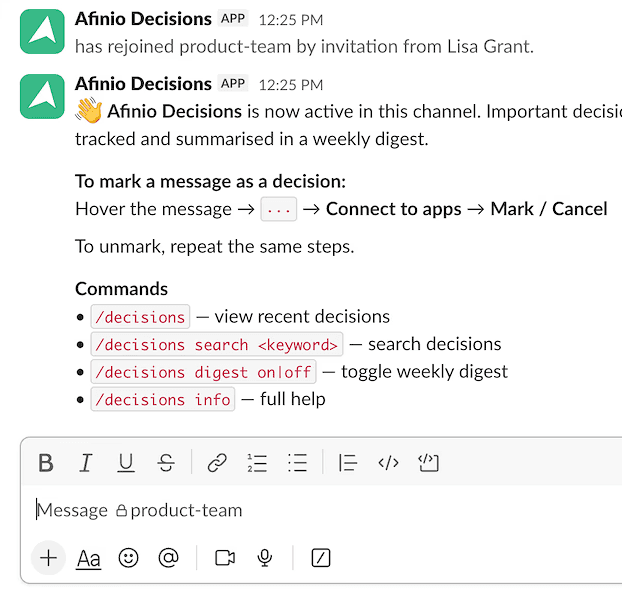
How Decisions Tracker app works
Step 1: Add Afinio to a Slack channel
Invite Afinio to the channels where decisions happen.
Step 2: Mark messages as decisions
No new habits required. Keep using Slack as usual.
Step 3: Generate a decision summary
Run /afinio anytime to see the key decisions from the last 7 days.
Step 4:Stay aligned automatically
Enable weekly summaries so decisions never get lost again.
Add Afinio app in Slack
Register your interest to follow Afinio’s development and help shape the future of ERG infrastructure.
Support
If you need help, have feedback, or want to report an issue, use </afinio feedback> inside Slack